1) Google AdSense
AdSense is by far the best, most rewarding monetization resource for blogs, news sites and small, content-rich information sites. Google offers AdSense, a service that lets independent publishers, bloggers and news site owners to publishtext-based, context-relevant ads next to the content on their sites. This is done automatically without you, the publisher, having to worry about anything else except putting small-sized code inside each of your Web pages.
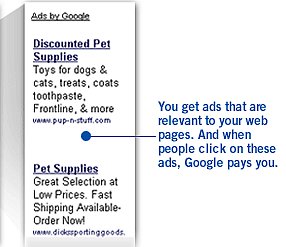
For every click on Google AdSense contextual ads, the publishing sites receives credit for a small amount of money, while Google keeps an undisclosed amount of the total advertising share. Though many lament lack of relevance for the ads and little return for the increased info clutter on their pages — many silent publishers — probably the ones who consciously make less noise about this, are making serious money with this program.
What few understand, is that to make AdSense work for you ($$),it involves strategic work. Just placing the code on your pages isn't enough. The focus of your site, the way the content is organized, the way web pages are coded, the titles you use and the color and position you select for placing your AdSense ads on your Web pages all make a difference to the results you get. Significant.
What is important is that different rules apply to different types of pages and content. So no set of rules equally apply to all sites. The key is for the publisher to keep questioning the integration of contextual, text-based ads by doing systematic, ongoing testing, experimentation and optimization. For a focused blogger, this can mean from a few hundred to a few thousand dollars per month. For a dedicated publisher covering high-paying information areas, it is possible to get into the 5-digit range without any major investments and with a relatively short time-to-market. I am not talking about a blogger in the traditional sense, but rather to focused and very professional independent information resources like SearchEngineWatch.com or Paidcontent.org, for example.
AdSense offers also the opportunity to monetize site searches while providing a powerful, lightning-fast search engine for your own site at no extra cost. By providing search-relevant ads on your site's search results pages. Google AdSense adds another great opportunity to monetize premium service and access with relevant text-based information about products and services.
Too bad Google AdSense doesn't let you select your contextual advertisers from its inventory.
Here some great examples of AdSense at work.
Alternative solutions to AdSense: Chitika, Kanoodle, Yahoo! Search Marketing andYahoo! Publisher Network (in beta).
2) Blogads
Blogads is an effective solution for taking control of your advertisers and comparing your profit share with your online ad agency. As the name clearly implies, Blogads is an advertising service for blogs. When the service first came out,As I mentioned that Blogads offers a great opportunity for small, independent publishers, blogs and news sites to sell their ad space in a direct and useful way.Blogads keeps 20 percent of your net revenue and sends you the rest by Paypal or check as soon as you reach a predetermined amount.
For your advertisers Blogads provides a great bonus in terms of speed and simplicity: "Ordering an ad takes just two or three minutes. Submit your image and/or text ad. Define its duration. Pay with Paypal's secure forms. You are done. After the blogger approves the ad, return to tweak and optimize clickthroughs, renew or order on new blogs."
In the case of Blogads the publisher has control over which ads to accept and which ones to reject.
Alternative services:
Crispads is an advertising network focused on blogs. Crispads allows publishers to place ads in blog entries so that they're included in their RSS/ATOM feeds to generate revenues for syndicated content.
grokAds - an advertising clearinghouse for both buyers and sellers which works with any type of site. Offers quick and easy advertising to a specific market.
Tagword - Much like Blogads, Tagword also lets you to select which kinds of ads you want to sell to your site visitors as well as setting the prices you want to charge. Add the code provided to your selected web pages and you are selling text ads on your site! Users can create their text ads directly and submit them in minutes. Purchased ads appear on your site as soon as you're ready.
or
Create your own Text-based Ads service
TextAds is an open source text ad management system for web sites using PHP. It's been deployed with content management systems like PostNuke and should work with any PHP-based website.
The Idya AdSystem is a text ad management solution for web sites. It supports keyword-driven text-ads and PayPal payments. Installing takes a few minutes. Simply upload it to your site, use the installer to install it, and your site is ready to show text ads. You can check the entire list of its features. The AdSystem uses PHP 4 and MySQL, though it port to other DBMSs. The AdSystem has been undergoing re-engineering for version 2, however, it looks like the site is at a standstill and hasn't been updated since 2003.
3) Amazon Associates
The Amazon Associates program lets independent online publishers with the opportunity to promote any product in Amazon's inventory as affiliate agents. All it takes is adding a small, identifying code to the links that take your site's visitors to a specific Amazon product page (books, DVDs, electronics, etc.). If the visitors who clicked on your link buy an item even if it's not the item you point to — you earn a small commission.
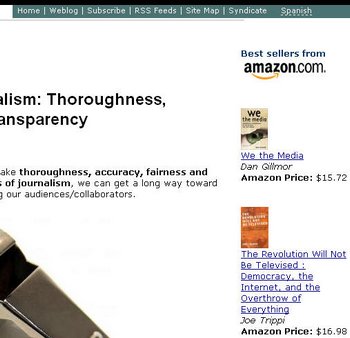
Though the amount of return with the Amazon Associates program is small, nonetheless, it is another way to get income without adding clutter or not-relevant disruptive information to your valuable content. References to relevant books add to the user experience as it helps those who want to search for more information on a topic to see immediate and hand-picked recommendations.
As a matter of fact, it is possible to earn as much as 10 percent per sale as an Amazon Associate.
4) Text Links
Text links are controversial for some purists, but for those seeking a way to monetize content without adding clutter and intrusive ads — it is an interesting opportunity to explore further. Text links are an emerging advertising market that brokers small, text-only links, which often don't need prominent placement (the payback is not on the clicks) on your site pages.
What the advertisers want is a link presence on your site to gain extra "authority" (like the Google PageRank indicator) in an artificial way. This is why you may have noticed many of these text links being placed at the bottom of content pages or in other non-premium positions. The goal is to increase a site's value in search engines. The good thing is that as this market grows, the independent publisher has more and more options from which to select. Also, the publisher can approve and accept text links that are complementary and relevant to the site's content.
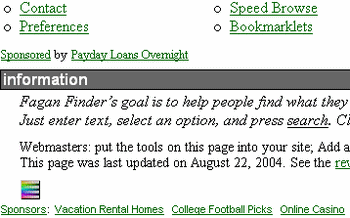
Though many text links point to second-rate services and products (online casinos, poker, Viagra, etc.) — this marketplace is growing and becoming more visible, therefore more advertisers of mainstream products and tools are popping up in numbers. Since you are the one accepting such advertising contracts, the selection of what you display is up to you.
To play this game, it is helpful to have a Google PageRank of 4 or more. (Here is an article where you can find out how to measure Google PageRank). For those having a PR value of 6, 7 or more, there is great opportunity for serious monetization. As an indicator, five or six text ads can easily bring in a few hundred dollars every monthon a PR 6 site/blog.
A Google generated list of companies brokering text link ads:http://tinyurl.com/66pc4
The example above: FaganFinder
(check the bottom of the home page to see what I mean)
Other online text link agencies: LinkAdage Auctions - Offers blog owners the chance to sell text links on their site at market value through a private online auction.
Text Link Brokerage
Paid Text Links
See also: Will Plain-Text Ads Continue to Rule? (Jakob Nielsen's Alertbox)
5) Premium Content Sponsorships
Selling sponsored space is another option for the independent publisher. While this was associated with prominent flashy banner ads, this is changing and expanding in many ways. In my view, the successful strategy is to use selected and relevant sponsors to introduce, give access or extend the value offered by premium content.
A relevant product or service can sponsor a news channel or RSS feed. Sponsors can also sponsor a rich section of additional related content to a standard article. Having a resourceful bibliography or annotated resources section in your next ebook or mini-guide is also fertile ground to effectively showcase relevant sponsors.
X-events, podcasts, live and recorded web conferences, online interviews are great unobtrusive and relevant sponsorship opportunities.
See also: New Online Advertising Strategies: No More Interruptive Ads
6) Related Reports
Another opportunity should see more in the near future is affiliate marketing of related research reports. For sites that cover specific industry or niche topics, this is an opportunity to play an effective marketing role for research clearinghouses and large publishers of intelligence reports, analyst insider briefings, white papers and research findings.
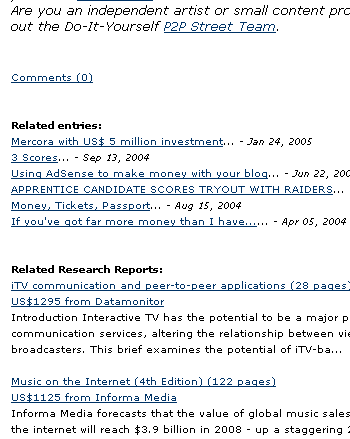
These types of reports usually carry a higher price tag than normal ebooks and physical publications. The reason for the high price tag is because their content is focused on specific industries and topics, and it has information that's hard to find elsewhere.
The technology that makes this possible is available from 21Publish (the blog hosting provider) in partnership with Market Research.
7) Affiliate Sales
A good monetization channel for select products and services is affiliate sales. This approach involves signing up to become an affiliate reseller of specific products.
As long as the affiliate products do not affect the publisher's credibility and provide pointers to useful, high-value products that the publisher fully endorses, affiliate sales are a rewarding monetization channel.
The commissions received for these sales vary depending on the product and the original vendor sales and marketing strategy. LinkShare and Commission Junction are two of the largest affiliate program brokers. Check out their catalogs to get a good idea of what products and commissions are available.
If you write and publish your own e-books and other premium content publications, you may want to consider using an affiliate sales program to give your products greater reach and exposure.
My preferred provider for this is Share-It!, which offers full payment and an ecommerce infrastructure to online publishers while integrating a customizable affiliate program. You can set the commission and the products that you want your affiliates to manage. Share-It! automatically takes care of payments and accountability of the transactions; it sends updates and timely sales reports both to you and to your registered resellers. The system even automatically creates content pages that the reseller can link to from her own site.
8) Online Guides and E-Books
Self-published books, e-books, mini-guides, tutorials and other types of premium content generate a respectable source of income for those with relevant and useful content to share. Focused guides and reference publications in niche areas are a growing demand from qualified customers, especially when these products can be easily pre-evaluated in some form.
For bloggers, news sites and small independent publishers' ebooks and online guides should make a natural monetization channel. Much of the content written for a site is easy to re-edit and re-purpose for commercial use. Reviewing editors, topic-specific bloggers can use their writing talent to put together the best content they have on a specific topic.
Selling ebooks requires good online marketing skills, lots of exposure, visibility and honest testimonials from satisfied buyers. A little army of affiliate resellers can go a long way in helping your ebook get extra exposure and visibility. Plus partnering/bundling your product with those who are already the best in your class helps get more copies out the door.
9) Bookstore Distribution and POD Publishing
You can also increase profitability and exposure of your e-books by using a company like Lightning Source, which can distribute your digital content on Amazon bookshelves while allowing you to offer printed versions of your masterpieces usingPOD technology (print on-demand).
See also: Turn your weblog into a book
Self-publishing with Lulu.com
Trafford Publishing
10) Merchandising
Selling your branded t-shirt or baseball cap makes sense when your publishing project has a strong brand, a powerful message or an issue that it stands behind.

Why would people shell out USD $20 or more to buy a branded t-shirt promoting a web site? If a bold tagline spells out a strong message or slogan about something of which many are passionate, readers want to support the cause by wearing them.
I think this works effectively where a) the personal brand is good enough to create a desire in readers to "stand" for it (few bloggers or news sites have this kind of charisma, but I people like Joi Ito or Howard Rheingold most likely can command some of this), or b) the author or blog / site stands for something clearly identifiable. It may be an overarching mission or a number of changing issues that make effective marketing themes for such products.
CafePress offers an extensive catalog of shorts, caps, calendars, mugs with over 80 customizable merchandise products waiting for your logo and tagline to be printed on them. CafePress provides the raw merchandise that you can customize by uploading your artwork and interactively adjusting it on through its online command center.
While CafePress charges a base cost for the material (e.g.: USD $13.99 base price for T-shirts), you can price your branded merchandise however you like and CafePress dutifully manages the transaction, payment, shipment and your monthly payments for your hard-earned commissions. In the process CafePress, also creates a full web-based shopping center that can be customized to match your Web site's design.
11) Collections, Anthologies, Compilations and Curated Content on CD-ROM
Thanks to CafePress and similar services, independent online publishers also have the opportunity to deliver vast amounts of content such as aggregated anthologies of articles, reports, audio and video files, or research collections on CD-ROM. All with complete infrastructure support for the mastering, duplication, labeling and shipping of these.

Again, the publisher pays a wholesale cost for the production of each CD-ROM ordered and the profit comes from the markup that the publisher decides on for each item sold. CafePress clears payments from customers, prints the CD, packages it and ships it to your customer. It sets aside your profit margin and cuts a check for you at the end of the month.
The publisher base price is USD $4.99 per CD (excluding shipping). You can mark up the price as much as you want and CafePress collects payments and sends your profit margin to you.
More info: CafePress Data CD
12) Paid Assignment
While many find this very controversial, more companies are using bloggers and independent sites to talk about, promote or cover specific products and issues. The Marqui program, in which I've participated, is a good example. But there are other ways to go about it. A person can go to a company and become its official online blogger. A person can take specific assignments for prominent sites and work for them, with or without credit, covering specific issues.
The important thing here is to be clear and upfront about it. People are inflexible about this because they're afraid that the people they trusted and read without question before may now write articles because they are paid for it.
From my point of view, I say the following:
a) question your sources, no matter how good they are and how fanatical you are about them.
b) take that ham away from your eyes: there is no objectivity, outside of the transparency of the reporter, blogger or news reporter. Everyone is influenced in one way or another. You don't need to take money from a customer to be influenced. What about all those journalists and bloggers who routinely receive free evaluations of gadgets and software that everyone else has to pay for? Doesn't that influence them? Invitations to press dinners? Product launches? Come on.
What counts, and what I think readers value the most, is being upfront, transparent and credible. Assuming you have been, like everyone else, "exposed" to cover certain issues rather than others — what matters is how "transparent" you are about revealing your driving motives, interests and goals while writing on that topic. Can you be influenced while remaining true to your opinions? I believe you can.
Taking money per se is not a disreputable act, neither is getting paid to write about a certain topic: isn't this what newspapers command their editors to do?
What the critics of paid assignments have underestimated is the large demand out there for this. If the paid writers are transparent, accountable and professional with their assignment, then this is as legitimate as any other activity.
I guess you only need to decide if you are in it for the art or the part.
Marqui paid USD $800 to the bloggers who did the assignment. Each one was required to write four articles a month that at least mentions and links to Marqui.
13) Donations
If you support a cause that goes beyond the mere reporting of news in your areas of interest, why not consider asking your readers for support?

People like to take a stand for the people whom they think can make a difference, so why not use this strategy to finance some of your effective communication campaigns? PayPal Donations, Amazon's Honor System and BitPass all offer a simple way to add a snippet of code to your site to make it easy for people to donate.
Depending on the system adopted, you may opt to receive money in euros, U.S. dollars, Japanese yen, pounds sterling and other currencies.
If all of the above fails:
a) Join a publishing network
If you are just starting up with your blog or small news site — and need either more traffic, exposure or experience before you feel you can do any of the above on your own — then joining a group blog may work for you.
Metafilter, Chris Pirillo's Lockergnome Channels, Blogcritics, WikiNews, Blogit or any of these group blogs, if not at my own MasterNewMedia, MasterViews andKolabora.com, where I am always looking for additional contributors.
Working in a group blog can ease the pressure of having to post on a daily basis, gives you greater exposure in less time and exposes you and your ideas to an existing community of interested readers and other writers.
In some cases, like at Weblogs Inc., Creative Weblogging, Squidoo and elsewhere, contributing bloggers are also paid a share of the advertising revenue their blog generates.
Another great alternative is to look into the creation of local news sites and Get Local News has a smart idea ready to be picked up.
b) Blog your best without worrying about making money in any direct way.Money comes as a consequence of your extra exposure and visibility. Blogging creates extra income by allowing you to enter in close contact with relevant people in your areas of interest, and by facilitating exchange and contact with prospective customers through your online presence.
Simply blogging with no strings attached increases your credibility and authority in the field and earns you extra income when you are called to give advice. Having a blog to showcase your ability to review, explore or analyze issues and products is the best way to market yourself and to provide a living showcase of your talents and abilities.
Listen:
Making Money - session from Bloggercon III
Doc Searls leads the Making Money session at Bloggercon III. Audio from IT Conversations. [runtime: 01:24:31, 38.7Mb, recorded 2004-11-06]
True Voice: The Business of Blogging
Session hosted by Stowe Boyd at the Blog Business Summit in Seattle on January 24, 2005, with Robert Scoble and Get Real contributor Greg Narian.
Read:
Make Money off Your Blog
The Washington Post - January 30, 2005
The Blogs' Long Tail: Blogs And RSS Profit Potential
All of the above are non-exclusive strategies that can be used in parallel with other activities to create multiple income streams for bloggers, news sites and other content-focused online resources.
A few guiding principles have stood out from my own experience in the search for creating multiple income streams for an independent online publisher, blogger or small news site:
- Relevance, Value
People want to see relevant information. Related to the main subject. If they like what they find, what better opportunity to give them more of what they want? Make your readers kings and queens at your site! The products and services a publisher selects should fit the editorial line of the blog/site as much as possible; this ensures a true continuum between articles and promotional messages. - Complementary
The additional ad or sponsorship information has to bring in value to the overall content. Selling prestigious and prominent content space for money without considering the relevance of the sponsoring firm to the sponsored content is a wasted opportunity for both sides. Given that no one enjoys being distracted by brand x or product z when trying to find something unrelated — why not leverage this natural and reasonable defense mechanism and match sponsors to relevant events and content spaces? Why not allow sponsors to provide extra value to the content/event offered by providing access/integration to premium-quality complementary resources? - Visual unobtrusiveness - Non-interruptiveness
Sponsorships, text-based ads, promotional messages don't have to scream for visual attention. If they complement and enrich what is already out there, they only need to be properly and intelligently juxtaposed, formatted and legible, scannable and printable, just like any other content on their hosting page. A site's web developer should have full control over the layout and positioning of these items by using CSS. - Publisher Control
The publisher must be king (or queen)
This is what I think. It is the publisher and not the advertising agency or some obscure algorithm that should control which ads show up on my web pages. It should be the publisher who takes the role of information director in full; not just in respect to what is written, but also about what is promoted. Separation of editorial and marketing offices is not an advantage in the type of new-media universe I envision.Services like Blogads and the text-link clearinghouses facilitate this by allowing publishers to maintain full control of who are going to be their advertisers.
Google AdSense provides some control of which ads are displayed by letting publishers filter out up to 200 advertisers that may not complement their content. Ideally, as I have advocated, a publisher should be able to select from a large inventory of relevant and complementary advertisers in the ads he wants to carry.
- Endorsement
A publisher should also in some way endorse the products she advertises as a way to provide value to her readers with such "recommendations." I have repeatedly refused to be a well-paid affiliate reseller or advertiser for products that I didn't believe in, while many times I have offered my space for free to companies and products which I thought deserved my readers' attention (proof is available, if needed). A sense of personal ethics and editorial coherence is all it takes.
Which monetization strategy to use?
Diversify income streams
Don't bet all your money on one horse and think like a coffee shop where money is made with many small transactions across a good variety of (generally low-cost) related offerings.
What I am learning is that you can make money by creating and cultivating multiple, small, income streams. Relying on one big source of income is always dangerous. If that resource disappears, so does your ability to survive.